Recently I've been researching Azure Stream Analytics which is described as
...a fully managed, real-time analytics service designed to help you analyze and process fast moving streams of data that can be used to get insights, build reports or trigger alerts and actions.
To preface, I'm not a developer. My goal in researching this product are to understand a few things:
- The architecture patterns for the service
- Security configurations for standards compliance
- Configurations of 'Infrastructure as Code' deployments
In this article, I'll be sharing what I've learned about this product from Microsoft.
Overview
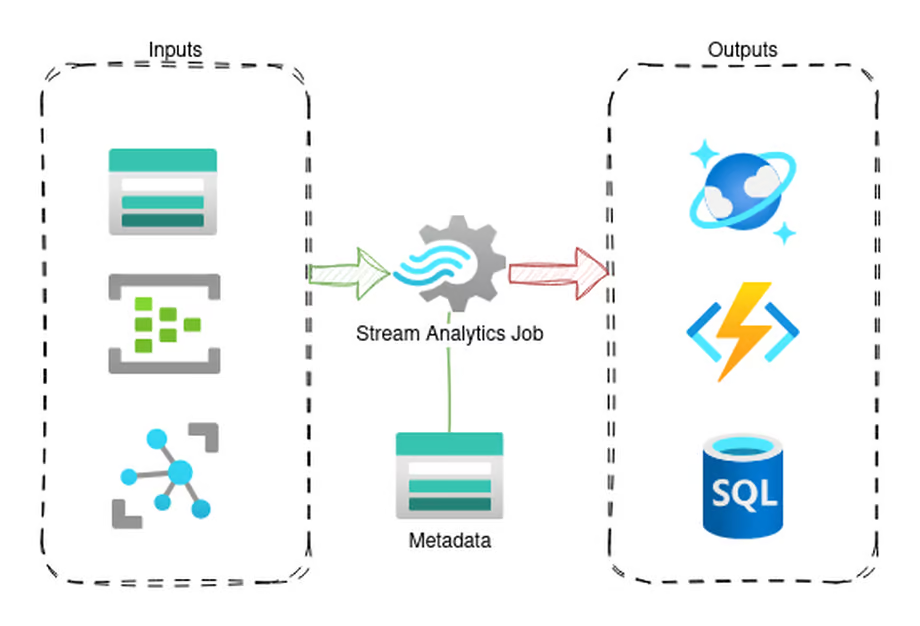
Azure Stream Analytics primarily consists of three main components:
- Inputs
- Outputs
- Transform Query
As well, Stream Analytics supports user-defined functions (UDF) and user-defined aggregates (UDA) written in Javascript. (C# was supported for UDF, but is being sunset as of writing)
Kafka inputs/outputs are also supported, but I'm not going to be talking about them here.
Inputs, Outputs, and the Transform Query
Inputs are divided into two types, Streaming and Reference inputs.
Streaming inputs would be inputs that contain the source data the job is acting on or transforming. Options for this are Blob Storage or Event Hub.
Reference inputs are finite datasets used in the process of the job. Think along the lines of reference lookup tables or such. These can be either Blob Storage or SQL sources.
Outputs are the landing area for your transformed or processed data. There are a lot of different output types, from SQL, Cosmos, Event Hub, Functions, Blob Storage, and more.
Transform Query is where the actual Stream Analytics Job takes shape. This query is, essentially, what is selecting data from your inputs into your outputs.
Architecture
V1 vs V2
Azure Stream Analytics introduced a new pricing and SU structure referred to as V2. In this article, I'll only be dealing with V2 as V1 is to be deprecated.
Overall, the change is to redefining Streaming Units and their values. The following table outlines more or less what this change is.
| Standard | Standard V2 (UI) | Standard V2 (API) |
|---|---|---|
| 1 | 1/3 | 3 |
| 3 | 2/3 | 7 |
| 6 | 1 | 10 |
| 12 | 2 | 20 |
| 18 | 3 | 30 |
| ... | ... | ... |
Make note of the API value, we'll come back to that.
Standard vs Dedicated SKUs
Like many Azure services, Stream Analytics has a Cluster resource. This allows you to run Stream Analytics Jobs within a Cluster.
According to the documentation, Stream Analytics Clusters provide:
- Single tenant hosting with no noise from other tenants. Your resources are truly "isolated" and perform better when there are burst in traffic.
- Scale your cluster between 12 to 66 SU V2s as your streaming usage increases over time.
- VNet support that allows your Stream Analytics jobs to connect to other resources securely using private endpoints.
- Ability to author C# user-defined functions and custom deserializers in any region.
- Zero maintenance cost allowing you to focus your effort on building real-time analytics solutions.
We'll discuss whether any of this is correct later.
Streaming Units (SU)
Streaming Units are an abstraction of compute and memory performance values. Understanding them is not very straight forward.
Microsoft's recommendation is to start with 1 SU for jobs without PARTITION BY and tune from there.
In general, the best practice is to start with 1 SU V2 for queries that don't use PARTITION BY. Then determine the sweet spot by using a trial and error method in which you modify the number of SUs after you pass representative amounts of data and examine the SU% Utilization metric. [Source]
The maximum streaming units for a job can be calculated. Refer to the following table.
| Query | Max SUs for the job |
|---|---|
| 1 SU V2 |
| 16 SU V2 (1 * 16 partitions) |
| 1 SU V2 |
| 4 SU V2s (3 for partitioned steps + 1 for nonpartitioned steps |
What this tells us is that job parallelization is critical in determining the SU utilization and throughput expectations for your job.
Networking
One of my biggest confusions when I started working with this service was its networking. For my employer's use case, restricting outbound traffic to prevent data exfiltration was a hard requirement.
VNet Support - To Cluster or Not to Cluster?
I recently wrote a blog post on Azure's methods of providing private networking access to resources. Azure Stream Analytics has two methods of accessing resources privately.
One method is through VNet injection. This works by having the underlying compute running the job provision interfaces into a subnet of your choosing. This has the benefit of traffic following your configured routing and allowing access to on-premise resources.
The other method is through managed private endpoints. This allows you to provision private endpoints to your resources into the environment the Stream Analytics job executes in.
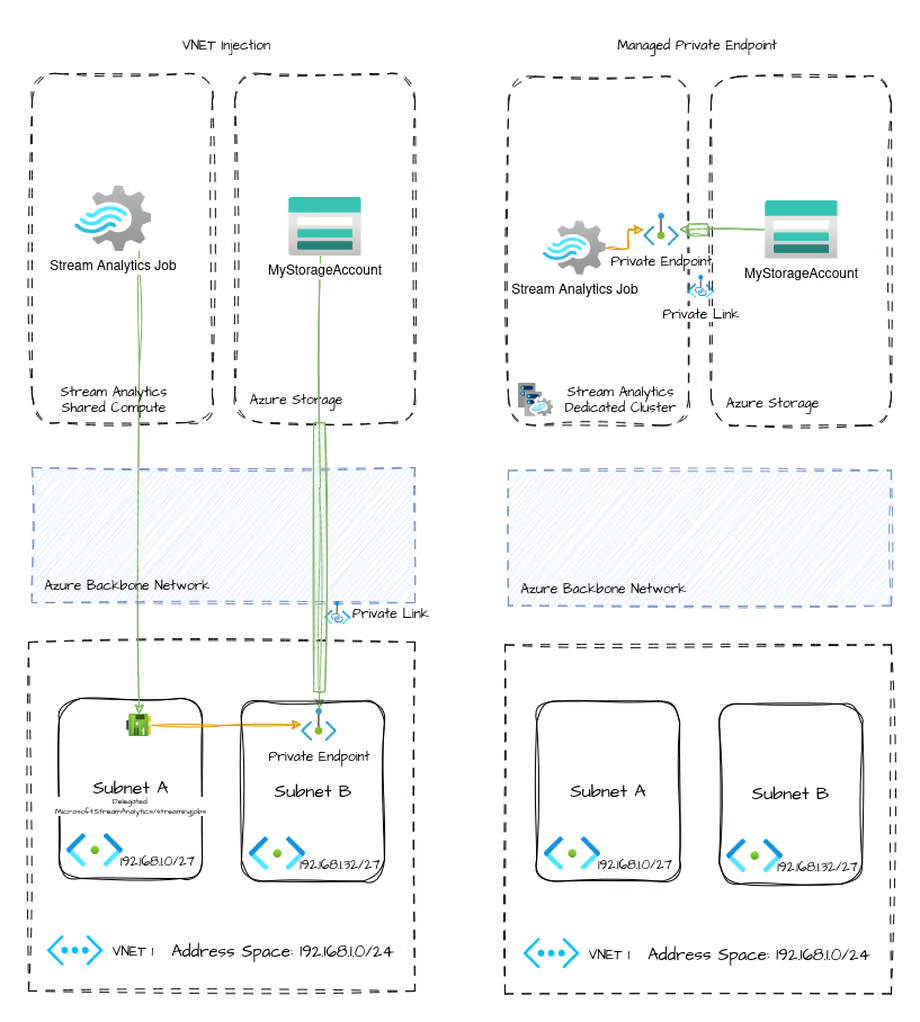
However, both of these methods are not available in all situations. The documentation is completley wrong on this (which I cover later), but this is the actual support:
| Standard | Dedicated | |
|---|---|---|
| VNet Injection | ✅ | ❌ |
| Managed Private Endpoint | ❌ | ✅ |
Basically, you can use VNet injection only when using a standalone job on shared compute. On dedicated compute (i.e. in a cluster) you can only use managed private endpoints. This is extremely counter intuitive because almost every other Azure resource this support is swapped.
In this way, when using a Stream Analytics Cluster for your job, there is no way to restrict outbound traffic. This leads to a data exfiltration risk.
Deployment
The structure of Stream Analytics makes deployment a bit of a challenge to tackle. This is because, unlike a serivce like a Function, App Service, Container, or others, the "code" for Stream Analytics is primarily configuration of properties on the resource itself and subtypes for inputs, outputs, functions, and transformations. This makes it impossible to draw a line between the infrastructure deployment and the "code" deployment.
For many use cases, this may be a non-issue. For some companies though, this causes a separation of duties problem. Now you have to decide between giving control over business logic to an infrastructure team, or giving control over infrastructure configuration to developers.
Microsoft's method of deploying Stream Analytics jobs via CI/CD pipeline involves an npm package azure-streamanalytics-cicd
This is the same utility that allows you to run the Stream Analtyics jobs locally.
azure-streamanalytics-cicd can output a definition of a Stream Analytics Job in either ARM or Bicep. If you've standardized on Terraform, you're on your own.
Update 2026-03-05: I was informed of an issue with azure-streamanalytics-cicd when attempting to use it within a pipeline. Specifically, an error like the following will be encountered:
Error: The file [..]/azure-streamanalytics-cicd/bin/LocalRunService.dll does not exist. There seems an error during the installation.
Please try 'npm install -g -f azure-streamanalytics-cicd' to reinstall the package.
After some research, I found this error to be a common one. Specifically, a good example is this GitHub Issue
After looking at azure-streamanalytics-cicd's there appears to be .NET 6 dependency. /azure-streamanalytics-cicd/lib/install.js gets invoked at post install, doing stuff depending on .Net present.
After some quick tests:
- if npm package is installed without presence of .Net 6,
binwon't appear, e.g. run.- if same npm install is invoked with
.Net 6.0.xinstall job present,binfolder is present and I believe package will work, e.g. run.Reason it worked on windows-2019 is probably because image was a long time deprecated and avoided .Net 6 removal.
— shamil-mubarakshin
Which is correct. The npm package for azure-streamanalytics-cicd has not been updated in two years. It depends on .NET 6 or .NET Core 3.1
Both of which are End of Life.
I guess CI/CD deployments of Stream Analytics just aren't agentic enough.
Update 2026-03-15: Microsoft published a version (3.1.6) addressing the fact that the package did not function on any modern OS. Only two years too late.
The Microsoft individuals I was working with have not acknowledged they did this. Instead, they suggested not using this utility and, instead, using ARM, Bicep, or Terraform to deploy the jobs directly.
I would have sympathy for this perspective if it wasn't the fact that this service is sold to customers, in part, based on the ease of development with their VSCode integration. If you do not use this utility, you cannot use that functionality.
That would only solve part of the problem due to the inaccurate, incomplete, and wrong documentation on the platform. If Microsoft wanted customers to use this service, they would show they cared.
Problems
While researching Azure Stream Analytics, I've found a number of documentation problems, inconsistencies, and support failings that result in this being a very difficult service to interact with.
One of the biggest problems I found while researching this service is the documentation. It seems, especially during the V2 general availability, documentation has been partially updated or, in some cases, updated with completely incorrect information.
Documentation
Starting with documentation, which is my biggest gripe about this platform. I hope this documentation was written by copilot becuase if not oof.
Cluster V2 API Support
The API documentation for clusters was never updated to reflect the V2 SKU.
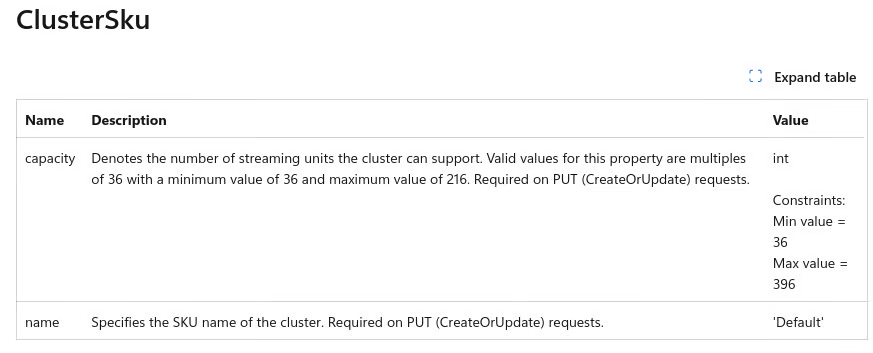
The value constraints are incorrect for both the SKU name and capacity values. Actual description should be something like this.
| Name | Description | Value |
|---|---|---|
| name | Specifies the SKU name of the cluster. Required on PUT (CreateOrUpdate) requests | 'Default' or 'DefaultV2' |
| capacity | Denotes the number of streaming units the cluster can support. Values differ depending on the SKU name. For Default SKU, values are a multiple of 36 between 36 and 216. For DefaultV2 SKU, values are a multiple of 120 from 120-1320 | int |
This being incorrect also contributes to 3rd parties not properly supporting this service, which we'll explore later
VNet Support
In nearly every place that the documentation discusses VNet support within Stream Analtyics it's wrong, or at the very least, internally inconsistent.
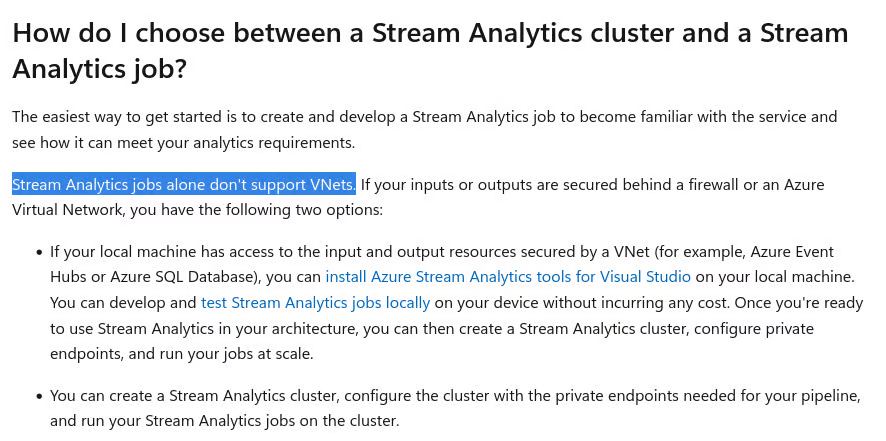
While the pricing page states that all SKUs have "Virtual Network Support"
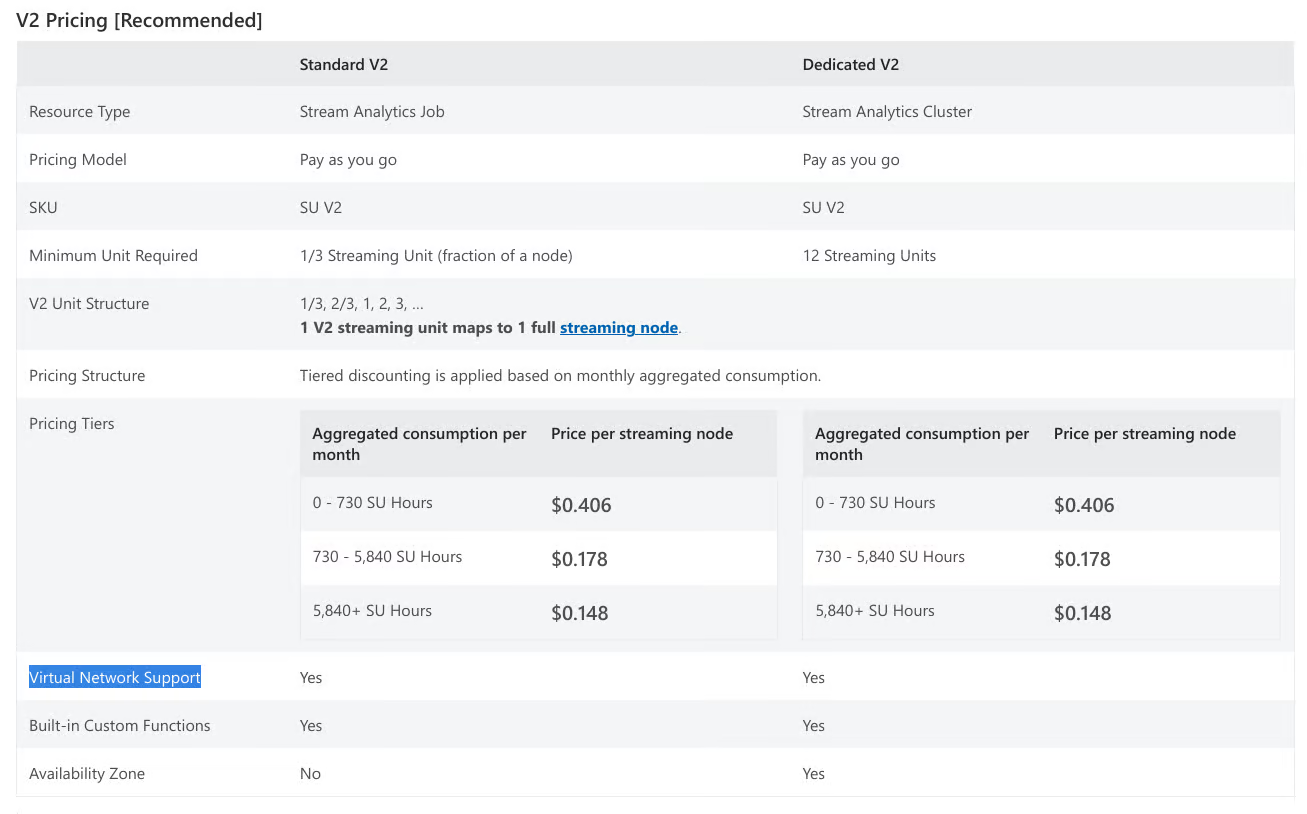
The fact that this is not consistent within itself is frustrating enough, until you find out that the truth is that Virtual Network support is only with Standard SKU jobs.
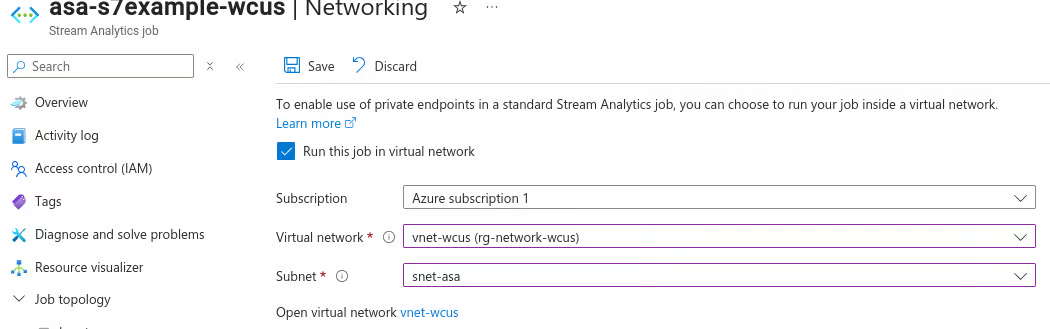
When you try to configure the Virtual Network integration with a job that has been added to a cluster, you see this.
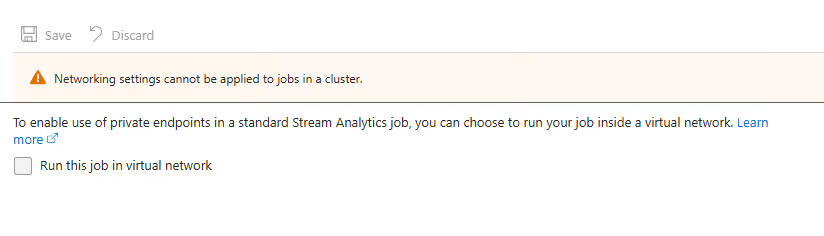
Ignoring the fact that clusters not supporting proper VNet injection is nonsensical on its own, the fact that this documentation is so wildly inconsistent and incorrect is truly a sign that Microsoft does not care for this product.
Update 2026-03-15: While workking with CI/CD Deployments, it came to my attention as well that the ability to configure VNet injection is completely undocumented in the API specification. There exists no documentation on the subnetResourceId parameter. I'm not the first to notice this either.
Microsoft clearly does not want customers to use this service in a regulated environment.
General Inconsistencies
Cluster Max SU is Wrong
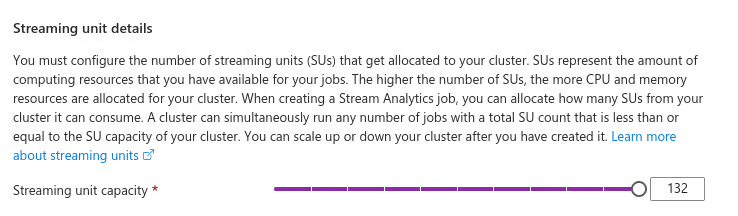
Nearly ever page on clustering lists the max SU as 66.

When the actual maximum is 132
Inconsistent requirements for VNet Support


The correct reading is that VNet support requires one SU v2 or six SU V1
Cluster Features
Lets revisit this list from the documentation:
- Single tenant hosting with no noise from other tenants. Your resources are truly "isolated" and perform better when there are burst in traffic.
✅ Not exactly measurable, but sure. I'll give them "less noise" and the nebulous "isolation"
- Scale your cluster between 12 to 66 SU V2s as your streaming usage increases over time.
❌ The max is 132, not 66 SU.
- VNet support that allows your Stream Analytics jobs to connect to other resources securely using private endpoints.
❌ Clusters do not support VNets, they support managed private endpoints
- Ability to author C# user-defined functions and custom deserializers in any region.
❌ This functionality was retired on 30th September 2024
- Zero maintenance cost allowing you to focus your effort on building real-time analytics solutions.
❌ This is not a feature of clusters as the same could be said about jobs.
1 for 5 isn't bad, right?
Terraform
Terraform is the biggest Infrastructure as Code toolset in the industry. It's ubiquitous in cloud deployments. Despite this, the azure-streamanalytics-cicd utility does not support Terraform output, only ARM and Bicep.
Microsoft does not publish an Azure Verified Module for Stream Analytics
The AzureRM Terraform Provider does not support V2 SKUs because Microsoft does not document it. Also lacking support for VNet injection in Stream Analytics Jobs.
Leaving the only way to use this service with Terraform to be the AzAPI Provider which I would not wish on my greatest enemy. Even then, the API is still undocumented.
Conclusion
Azure Stream Analytics, as a service, may perform as described. I haven't used it in the real world yet. However, what I can say is that the service does not have the care and attention that I expect it to have if it's to be a go-forward service for Azure.
On a call with Microsoft where I discussed some of these issues with them, they pushed Microsoft Fabric's Real-Time Intelligence, rather than appropriately address the concerns of this product.
"But the Microsoft documentation is on GitHub and you could make issues/PRs to address some of these"
I could sure. But no, I'm not going to donate my time and effort to a trillion dollar company that could employ a team of one hundred full time engineers whose only job is to ensure Azure Stream Analytics documentation is correct, and not have it effect their bottom line. If you're going to charge money for a product, the least you can do is accurately document it.
As well, the quality of documentation is an indicator of how much a company values their customer's time and how much pride they have in their products. This documentation is no different.
I wish I could say I expected better from Microsoft.